Stolen EC2 Credentials, Replayed Off-Box: Why I Locked Instance Credentials to the VPC — and Why AWS Should Too
An attacker stole an EC2 instance’s temporary AWS credentials and used them from their own laptop. One IAM condition key shut that down completely. This post is the incident, the control that actually worked, the trade-offs of that control, and a question about AWS defaults I can’t stop asking.
Contents
- The incident in one picture
- What happened
- Why “just enforce IMDSv2” is not enough
- How IMDSv2 actually works — and the hop limit
- The control that worked: aws:Ec2InstanceSourceVpc
- The implementation nuance that matters
- Trade-offs: what VPC-binding costs you
- Comparison: IMDSv2 vs the condition key
- The question: why is this opt-in, not the default?
- Fact-check & resources
The incident in one picture
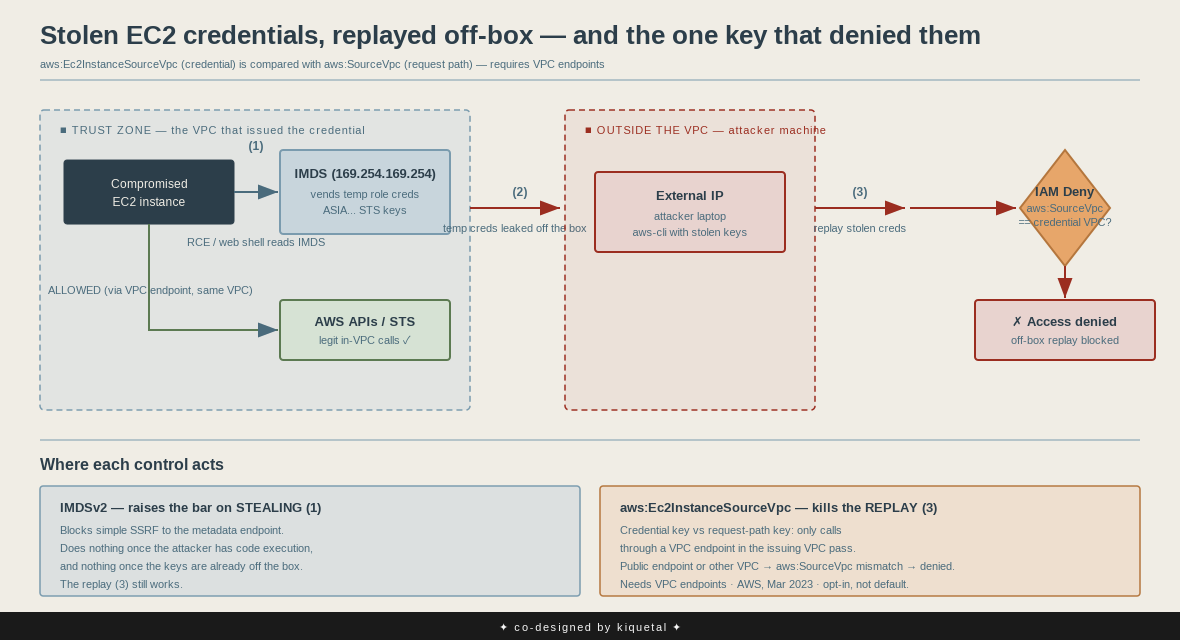
The short version: the credentials were stolen successfully. What saved us was not stopping the theft — it was making the stolen credentials worthless the moment they left the network.
What happened
Two steps, textbook pattern:
- Theft. A compromised EC2 instance leaked its temporary IAM role
credentials — the
ASIA…STS keys that AWS vends through the Instance Metadata Service (IMDS) at169.254.169.254. Any code with execution on the box can read them. - Replay. The attacker took those keys and called the AWS API from an
external, non-AWS IP — their own machine. This is the pattern GuardDuty
labels
InstanceCredentialExfiltration.OutsideAWS.
Temporary instance credentials are not short-lived enough to save you here. The STS keys IMDS vends are valid for hours, and they are auto-rotated — so an attacker who keeps reading IMDS keeps getting fresh keys. “They expire” is not a defense.
Why “just enforce IMDSv2” is not enough
The reflexive advice when instance credentials leak is “enforce IMDSv2.” We had IMDSv2. Here is the uncomfortable truth about what it does and does not do.
IMDSv2 changes how you talk to the metadata endpoint: it requires a
session token obtained with a PUT before any GET, and it enforces a hop
limit so a request bounced through a proxy (classic SSRF) can’t reach IMDS. That
is real and worth having.
But look at where it acts in the diagram — it only raises the bar on step (1), stealing:
- It blocks simple SSRF — the “trick the app into fetching the metadata URL” class of bug.
- It does nothing once an attacker has code execution on the instance. A web
shell or an RCE can perform the
PUT+GETdance exactly like the SDK does. - It does nothing once the credentials are already off the box. The replay from the attacker’s laptop in step (3) never touches IMDS at all.
So IMDSv2 is necessary, not sufficient. It narrows the ways credentials get stolen. It does not touch the ways stolen credentials get used.
How IMDSv2 actually works — and the hop limit
It’s worth being precise about how IMDSv2 raises the bar, because the mechanism is the reason it stops SSRF but nothing downstream.
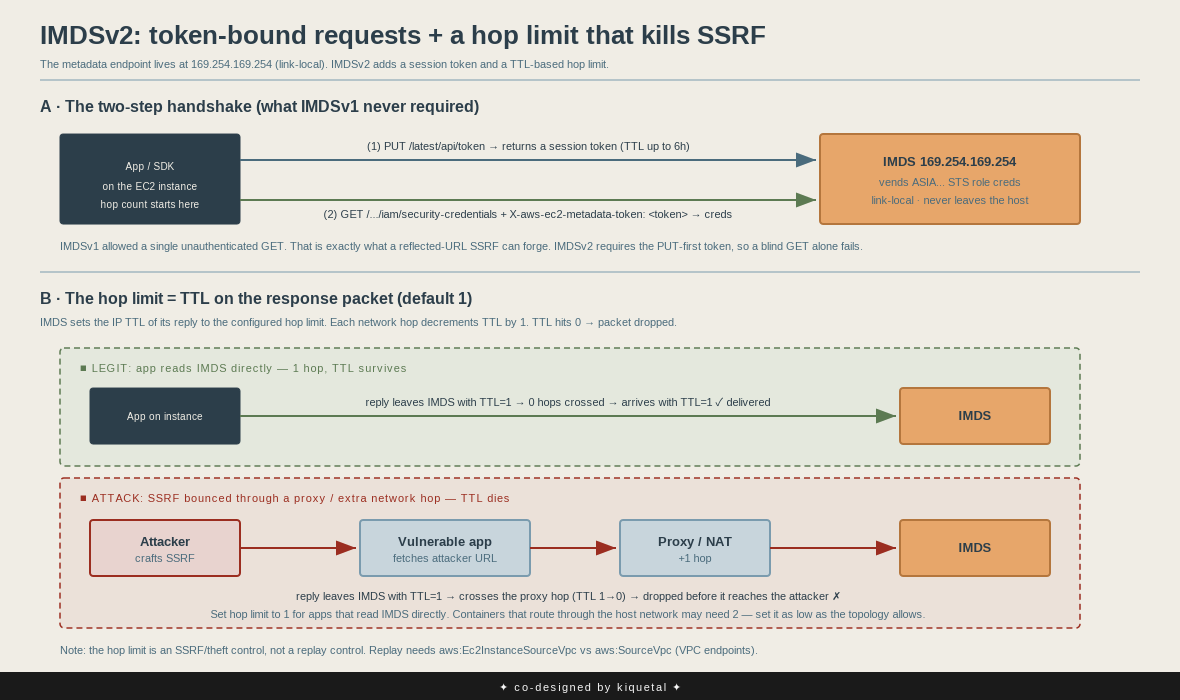
The token handshake. IMDSv1 answered a single unauthenticated GET. IMDSv2
requires two steps:
PUT /latest/api/token→ IMDS returns a session token (TTL up to 6 hours).GET /latest/meta-data/iam/security-credentials/<role>with that token in theX-aws-ec2-metadata-tokenheader → IMDS returns the credentials.
A reflected-URL SSRF (where you trick an app into fetching an attacker-supplied
URL) can usually only do a blind GET. It can’t do the PUT-first dance, and a
GET without the token header fails. That single change kills the classic
“fetch http://169.254.169.254/...” SSRF.
The hop limit. This is the part people set and forget without understanding.
The IMDS response leaves the metadata service with its IP TTL set to the
configured hop limit (default 1). Every network hop the packet crosses
decrements TTL by one; when TTL hits 0, the packet is dropped.
- An app reading IMDS directly on the instance crosses zero extra hops — the reply arrives with TTL still positive and is delivered. ✅
- An SSRF that bounces the request through a proxy, NAT, or an extra network
boundary forces the reply across one more hop. With hop limit
1, TTL decrements to0at that hop and the reply is dropped before it reaches the attacker. ❌
Practical guidance: set the hop limit to 1 for workloads that read IMDS
directly. Containers whose traffic routes through the host network namespace
sometimes need 2 — set it as low as your topology allows, and no lower.
Hop count by topology
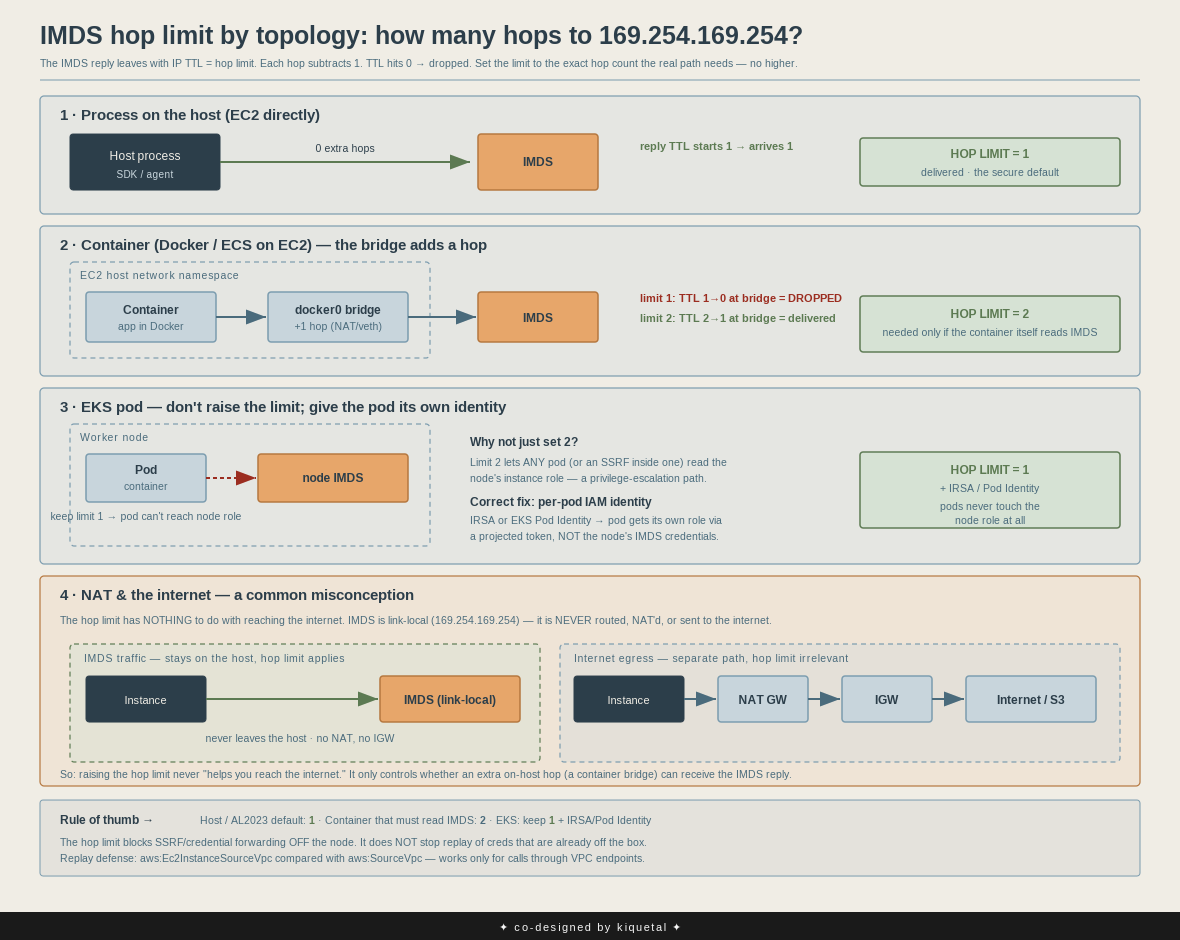
The right hop-limit value depends entirely on how many network hops sit between the thing reading IMDS and the metadata service. Here are the cases that come up in practice:
- Process on the host (EC2 directly). Zero extra hops — the reply leaves IMDS
with TTL
1and arrives with TTL1. Hop limit1. This is the secure default (and what Amazon Linux 2023 sets). - Container on EC2 (Docker / ECS on EC2). The packet crosses one extra hop at
the
docker0bridge (the veth/NAT boundary into the container network). With hop limit1, TTL decrements to0at the bridge and the reply is dropped; the container’s IMDS call hangs. Hop limit2is required — but only if the container itself needs to read IMDS. - EKS pod. Don’t reflexively raise the limit to
2. Doing so lets any pod — or an SSRF inside any pod — read the worker node’s instance role, which is a privilege-escalation path (a pod should not inherit the node’s AWS permissions). Keep the hop limit at1and give the pod its own identity with IRSA or EKS Pod Identity: the pod receives a projected token and assumes its own IAM role, never touching the node’s IMDS credentials. - NAT / internet egress (common misconception). Raising the hop limit does
not “help you reach the internet.” IMDS lives at the link-local address
169.254.169.254— it is never routed, never NAT’d, never sent through an Internet Gateway. Internet egress (instance → NAT Gateway → IGW → internet) is a completely separate path that the hop limit does not touch. The hop limit only governs whether an extra on-host hop (like a container bridge) can receive the IMDS reply.
Rule of thumb: host / AL2023 default is 1; a container that must read IMDS
needs 2; on EKS keep 1 and use IRSA / Pod Identity.
The crucial caveat, and the bridge to the rest of this post: the hop limit is an SSRF / exfil-path control, not a replay control. It governs whether a packet can leave toward the metadata endpoint on the box. Once the credentials are already off the box — in the attacker’s hands on their own machine — the hop limit is irrelevant. That gap is exactly what the next section closes.
The control that worked: aws:Ec2InstanceSourceVpc
Correction (2026-11-10): an earlier version of this section showed a deny that compared the key to a hard-coded VPC ID and claimed the key describes where the request comes from. That was wrong. The key describes the credential, so on its own it cannot detect a replay. It only works when you compare it with a key that describes the request’s network path, and that path key is only populated for VPC-endpoint traffic. The text below follows the pattern in the AWS Security Blog.
The replay was neutralized by an IAM deny that compares two different values:
aws:ec2InstanceSourceVPC— a property of the credential. It is the ID of the VPC where the instance that was issued the credentials runs. AWS sets it on every EC2 instance credential automatically, and it travels with the stolen keys.aws:SourceVpc— a property of the request’s network path. When a call reaches an AWS service through a VPC endpoint, it holds the ID of the VPC the endpoint lives in. When the call goes to a public service endpoint, it is null.
{
  "Version": "2012-10-17",
  "Statement": [
    {
      "Sid": "DenyInstanceCredsOutsideTheirVpc",
      "Effect": "Deny",
      "Action": "*",
      "Resource": "*",
      "Condition": {
        "StringNotEquals": {
          "aws:ec2InstanceSourceVPC": "${aws:SourceVpc}"
        },
        "Null": {
          "ec2:SourceInstanceARN": "false"
        },
        "BoolIfExists": {
          "aws:ViaAWSService": "false"
        },
        "ArnNotLike": {
          "aws:PrincipalArn": ["arn:aws:iam::*:role/aws:ec2-infrastructure"]
        }
      }
    }
  ]
}
Line by line:
StringNotEquals— enforcement. Deny when the credential’s VPC (aws:ec2InstanceSourceVPC) is not the VPC the request arrived through (${aws:SourceVpc}). The${...}makes the right side a variable, so the comparison is credential-vs-request instead of credential-vs-constant.Nullonec2:SourceInstanceARN— scoping. That key exists only on EC2 instance credentials, so IAM users, Lambda roles and other principals are not caught by this deny.BoolIfExistsonaws:ViaAWSService— lets AWS services that act on your behalf (for example Athena reading S3) through.ArnNotLike— exempts theaws:ec2-infrastructurerole that EC2 uses to mount encrypted EBS volumes.
Why the attacker is stopped: they replay the stolen keys from a laptop, which
calls a public endpoint. aws:SourceVpc is null, it cannot equal the
credential’s VPC, and AWS states that this policy denies every request made with
the instance credential that does not go through a VPC endpoint. Even if the
attacker used a VPC endpoint in their own VPC, aws:SourceVpc would be their
VPC and would not match. The only requests that pass come through an endpoint in
the VPC that issued the credential, which means from inside it.
The implementation nuance that matters: it needs VPC endpoints
This is the part I got wrong the first time, and it is the most important constraint of the whole pattern.
aws:ec2InstanceSourceVPCandaws:ec2InstanceSourcePrivateIPv4are credential-relative. They are always present on an instance credential, including on a stolen copy, and they never change.aws:SourceVpc,aws:SourceVpceandaws:VpcSourceIpare network-path-relative. They are populated only for requests that arrive over a VPC endpoint, and are null for public endpoints.
Alone, the credential key proves nothing about where the call came from. The
protection exists only in the comparison, and the comparison needs the path
key, so every call your workload makes has to go through a VPC endpoint. That
means gateway endpoints for S3 and DynamoDB and interface endpoints (PrivateLink)
for the other services. Traffic through a NAT gateway or internet gateway leaves
aws:SourceVpc null and is denied, including your own legitimate calls.
aws:ec2InstanceSourcePrivateIPv4 can be compared with ${aws:VpcSourceIp} in a
second deny statement to pin the credential to one instance’s IP. AWS advises
using it only together with the VPC condition, because private IPs repeat across
environments.
Trade-offs: what VPC-binding costs you
This is not free, and it is not right for every workload:
- You must run VPC endpoints for everything you call. Each interface
endpoint costs money (hourly per AZ plus data processing), and you have to
create and maintain them. Any service without an endpoint, or reached through
NAT, fails with
AccessDenied. - Some APIs ignore VPC endpoints. AWS warns that, for example, the EFS
ClientMountpermission does not go through the endpoint, so the policy blocks mounting EFS. Plan exceptions withNotAction(AWS showsiam:*) or by role tag. - Legitimate off-instance use breaks too. An on-prem job assuming the instance role, a CI runner or a cross-account tool using those credentials looks identical to an attacker. Inventory these paths first.
- It is a deny, so debugging is a cliff. Calls fail with
AccessDeniedand no hint about why. Set up CloudTrail queries and a dashboard before rollout. - Placement matters. As an SCP it covers a whole OU. As a resource policy (AWS shows an S3 bucket example) it protects one resource. Choose deliberately.
For workloads that already run in private subnets with endpoints for the services they use, the cost is small and off-instance replay stops working.
Comparison: IMDSv2 vs the condition key
| Aspect | IMDSv2 | aws:Ec2InstanceSourceVpc deny |
|---|---|---|
| What it protects | How credentials are stolen | How stolen credentials are used |
| Stops simple SSRF | ✅ Yes | ➖ N/A (not its job) |
| Stops theft after code execution (RCE/web shell) | ❌ No | ➖ N/A |
| Stops off-box replay (step 3) | ❌ No | ✅ Yes, when calls go through VPC endpoints |
| Depends on network path | ❌ No | ⚠️ Yes — needs VPC endpoints (aws:SourceVpc) |
| Config effort | Instance / launch-template setting | IAM policy / SCP authored by you |
| Breaks legit off-box use | No | ⚠️ Yes — must inventory first |
| Default in AWS? | Now default on new instances | ❌ Opt-in only |
The row that matters: these controls act in different places. IMDSv2 is upstream (theft), the condition key is downstream (use). You want both. They are not substitutes.
The question: why is this opt-in, not the default?
Here is what bothers me. AWS already knows which VPC issued the credential — that’s the whole reason the key exists and is auto-populated on every instance credential. What it cannot tell the policy engine for free is where the request came from, unless the call arrives over a VPC endpoint.
So the practical result is that off-box replay protection is opt-in and has a real prerequisite: you must build and pay for VPC endpoints for every service you call, write the comparison policy yourself, and plan exceptions. Most teams have never heard of the keys, launched in March 2023.
I understand why a hard default is difficult: it would break workloads that legitimately use instance credentials off-instance, and it would force endpoint architecture on everyone. But AWS has shipped “secure by default with a documented opt-out” before (IMDSv2 is now the default on new instances; S3 Block Public Access; EBS encryption by default). So my question is narrower than “make it the default”: why is there no first-class way to bind instance credentials to their VPC that does not require running VPC endpoints for every service?
Why is this still opt-in and endpoint-dependent, AWS?
Fact-check & resources
Every technical claim here is verified against AWS documentation:
- The keys
aws:EC2InstanceSourceVPC(VPC ID) andaws:EC2InstanceSourcePrivateIPv4(primary private IPv4) launched 2023-03-06, in all Regions including GovCloud and China, at no extra charge — AWS What’s New: IAM Roles for Amazon EC2 credential control properties - Purpose and how to author the policies — AWS Security Blog: How to use policies to restrict where EC2 instance credentials can be used from
aws:SourceVpcpopulating only for VPC-endpoint traffic — AWS global condition context keys- Detection can be bypassed via VPC endpoints, which is why the IAM deny matters — hackingthe.cloud: Bypass Credential Exfiltration Detection
Casing note: AWS docs write the key as aws:EC2InstanceSourceVPC. IAM
condition-key matching is case-insensitive, so aws:Ec2InstanceSourceVpc (used
in the policy above) is equivalent and valid.
No account IDs, instance IDs, attacker IPs, or access keys appear in this post — the VPC ID above is a placeholder. Incident specifics stay in the private report.