Keeping AWS Solutions Architect Pro current without the exam: the Skill Builder Maintain path
My AWS Certified Solutions Architect – Professional (SAP-C02) credential expires on 2026-12-13. Rather than blocking out a weekend to retake a three-hour exam, I am taking the newer Maintain path on AWS Skill Builder: complete curated training and hands-on labs to extend the credential by one year. This post explains how that path works, the eligibility details that are easy to miss, and the study plan I put together to hit the required 700 points.
Contents
- Two ways to keep a certification current
- How the Maintain path works
- The math: planning a route to 700
- Tracking progress
- Result: passing score reached (740/700)
- Course 01: Protecting and Encrypting Data
- Course 02: Edge Security
- Course 03 (Lab): Resolve VPC Routing Conflicts
- Course 04 (Lab): Inter-Region Peering
- Course 05: Advanced Architecting on AWS
- Course 06: Centralized Account Management
- Why write this down
Two ways to keep a certification current

AWS certifications are valid for three years. You can keep them current in two ways:
- Renew — pass the latest version of the exam. Extends the credential by +3 years.
- Maintain — complete curated training plus labs on AWS Skill Builder. Extends the credential by +1 year. This is the path I am using.
The trade-off is straightforward: Renew buys you three years but costs you a full exam sitting; Maintain buys you one year for a few hours of self-paced learning. Since I recently went deep on security topics (I just passed the Security Specialty), the Maintain path lets me keep the Pro credential current while continuing to learn in the same domain, without the exam overhead.
How the Maintain path works
These are the mechanics, verified against official AWS sources:
- Eligibility: available when your certification is within 90 days of expiration and still active. Expired certifications are not eligible — if you let it lapse, Maintain is off the table.
- Prerequisite: an active paid AWS Skill Builder subscription (Individual monthly/annual, or Team).
- Where: in Skill Builder, go to Explore → Validate your skills → Recertify, then select Solutions Architect – Professional.
- Threshold (Professional): earn 700 points, including at least two practical activities (hands-on labs). (The Associate level requires 500 points and at least one lab.)
- Pace: self-paced; finish everything before your certification expires.
- Result: the certification is extended by one year from the completion date.
- Cascading extension: maintaining SA – Professional also extends a still-active related lower-level cert (for example SA – Associate) to match the new expiration date.
- Status: this maintenance experience is currently in open Beta.
The two details that matter most in practice: you must start while the cert is still active (the 90-day window is a window, not a grace period), and the 700-point total is the binding constraint — the two-lab minimum is easy to hit, but reaching 700 takes planning.
The math: planning a route to 700
Courses on the recert path are worth anywhere from 40 to 160 points; the SimuLearn labs are worth 100 each. Rather than grab points at random, I weighted my plan toward SA-Professional exam domains — architecture, networking, hybrid connectivity, and security — so the points do double duty as real study.
Here is the route I planned. The recertification only requires two labs and 700 points, but Skill Builder flags four SimuLearn labs as the highest-value practice for SA-Professional domains — complex networking, hybrid connectivity, multi-region, and data security. Since the point of this is to actually get better, not just to tick the box, I chose to do all four and aim past the minimum, for a target of at least 800 points:
| Item | Type | Points |
|---|---|---|
| AWS SimuLearn: Resolve VPC Routing Conflicts | Lab | 100 |
| AWS SimuLearn: Inter-Region Peering | Lab | 100 |
| AWS SimuLearn: Securing Hybrid Access | Lab | 100 |
| AWS SimuLearn: Securing a Banking Data Lake | Lab | 100 |
| Advanced Architecting on AWS - Online Course Supplement | Course | 160 |
| AWS Security Engineer - Edge Security | Course | 100 |
| AWS Security Engineer - Protecting and Encrypting Data | Course | 80 |
| AWS Security Engineer - Centralized Account Management | Course | 80 |
| Total | 820 |
That is 820 points — well over the 700 minimum — with the two-lab requirement exceeded (four labs). I added Centralized Account Management to clear 800: multi-account governance (AWS Organizations, SCPs) is a core SA-Professional domain, so it earns its place on learning value, not just points. The route leans deliberately toward hands-on activities because that is where the real learning is, and the nice property of this planning is that items are swappable — the point total is the binding constraint, so you can trade one item for another as long as the total holds.
Tracking progress
Once enrolled, you work toward the minimum points; Skill Builder shows a live progress bar against the 700-point threshold and the two-lab requirement:
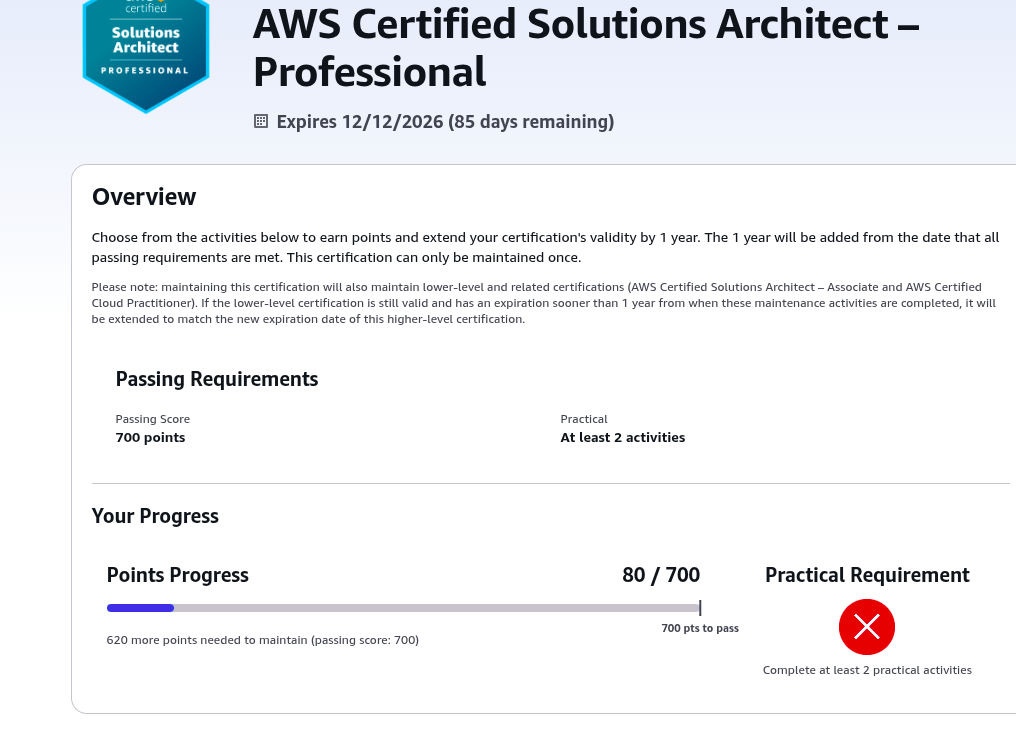
I track each course in its own notes folder — one source of truth per course — and record what I learned in the sections below as I complete them.
Result: passing score reached (740/700)
The credential is now extended. Skill Builder shows 740 points against the 700-point threshold and 2 of 2 practical activities completed — the new expiration is 2027-09-24:
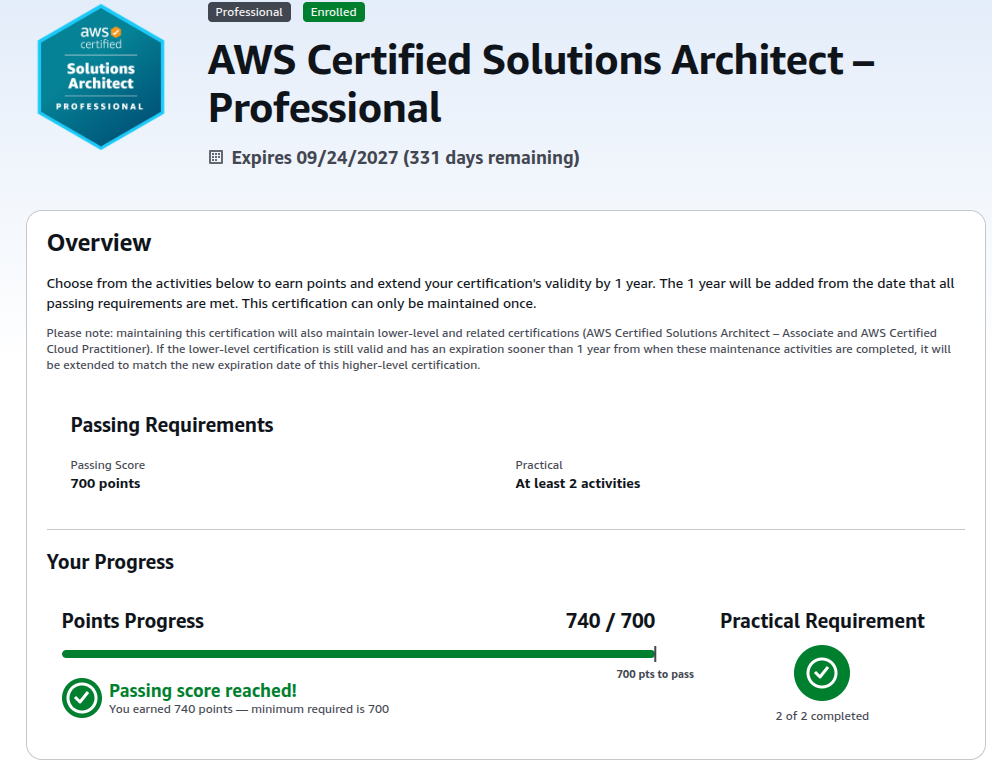
How it actually went versus the plan is worth being honest about: I reached the threshold with two labs, not four. The planned “Securing Hybrid Access” and “Securing a Banking Data Lake” labs turned out to be unnecessary once the points added up. What pushed me over 700 was a course I had already completed back in 2022 — Deploying Serverless Applications (120 points) — which still counted toward the total. Here is the actual set of activities that earned the 740:
| Item | Type | Points | Completed |
|---|---|---|---|
| AWS Security Engineer: Protecting and Encrypting Data | Course | 80 | 2026-09-18 |
| AWS Security Engineer: Edge Security | Course | 100 | 2026-09-19 |
| AWS Security Engineer: Centralized Account Management | Course | 80 | 2026-09-25 |
| Advanced Architecting on AWS - Online Course Supplement | Course | 160 | 2026-09-24 |
| Deploying Serverless Applications | Course | 120 | 2022-12-14 |
| AWS SimuLearn: Resolve VPC Routing Conflicts | Lab | 100 | 2026-09-19 |
| AWS SimuLearn: Inter-Region Peering | Lab | 100 | 2026-09-19 |
| Total | 740 |
The practical lesson: the 700-point total is the only binding constraint, and prior eligible completions count. If you have taken Skill Builder courses in the past, check whether they still apply before planning a route from scratch — mine saved me two labs.
Course 01: Protecting and Encrypting Data (done)
The first course I finished, AWS Security Engineer: Protecting and Encrypting Data (80 points, ~1h), was a solid refresher on data protection across the AWS stack. The parts worth remembering:
- Encryption fundamentals — symmetric (same key to encrypt and decrypt) vs asymmetric (a key pair: one encrypts, the other decrypts); hashing as a one-way operation for integrity, not confidentiality; and digital certificates as identity proof via public-key cryptography.
- KMS key material origins — the distinction between the KMS key (the
object you control) and the key material (the bytes that do the crypto),
and the four origins:
AWS_KMS(default),EXTERNAL(you import material, but it ends up inside KMS),AWS_CLOUDHSM, andEXTERNAL_KEY_STORE/ XKS (material never enters AWS; crypto is proxied out). The confusing pair isEXTERNALvsEXTERNAL_KEY_STORE: import-into-KMS vs stays-outside-forever. - Data at rest — S3 encryption (SSE-S3 / SSE-KMS / SSE-C) and the S3 Bucket Key cost optimization; the gotcha that EBS/FSx encryption and KMS key are set at creation (re-keying means snapshot-copy or backup→restore, never in place); S3 Object Lock (WORM) in Governance vs Compliance modes; and lifecycle/retention across S3, EFS, and FSx.
- Data in transit — choosing between PrivateLink, Client VPN, Verified Access (zero-trust, no VPN), Site-to-Site VPN, Direct Connect (not encrypted on its own — add VPN/MACsec), and Nitro instance-to-instance encryption.
- Discovery & masking — Macie for sensitive-data discovery in S3, and
CloudWatch Logs data protection policies that mask PII/credentials at
ingestion (guarded by the
logs:Unmaskpermission).
Services covered: KMS, ACM, S3 encryption, Secrets Manager, Macie. Full notes and diagrams live in the course’s folder in my recert tracker repo.
Course 02: Edge Security (done)
The second course, AWS Security Engineer: Edge Security (100 points, ~1h15m), is about defending the perimeter — where the public internet meets your AWS environment — before traffic ever reaches the VPC. What stuck:
- Edge vs. network controls — edge services (CloudFront, WAF, Shield) filter internet traffic at AWS’s points of presence (“border security”); network controls (security groups, NACLs, Network Firewall, Transit Gateway) are the internal checkpoints once traffic is inside the VPC.
- The layered edge defense — Shield (L3/L4 always-on, or Advanced for L7 + the DDoS Response Team + cost protection) → CloudFront (CDN, HTTPS, Origin Access Control, Lambda@Edge) → WAF (L7 filtering: SQLi, XSS, OWASP Top 10, rate-based, geo, custom rules) → API Gateway (throttling, usage plans, request validation) → origin. CloudWatch + EventBridge close the monitoring/response loop.
- Geo-control granularity (a useful exam distinction) — WAF geo-match +
URL-path is the most precise (restrict
/adminby country while the rest stays global); CloudFront geo-restriction is whole-distribution; Route 53 geolocation is DNS/endpoint routing. - Advanced controls — adaptive/behavioral rate limiting, JA4 TLS fingerprinting, CAPTCHA/challenge actions, signed URLs vs. signed cookies, and Verified Access (zero-trust, VPN-less, evaluates identity and device posture per request — not to be confused with Verified Permissions, which is Cedar-based app authorization).
- IoT edge — IoT policies with
${iot:ClientId}policy variables scope each device to connect only as itself and publish only to its own topic (least-privilege across a fleet). - Third-party integration & OCSF — normalizing security events with the Open
Cybersecurity Schema Framework, isolating third-party WAF rule groups (start in
Count mode, internal rules take priority, easy rollback), and structuring OCSF
data in S3 with
vendor=/category=/classification=/year=...prefixes for scoped access and cheap event filtering.
Services covered: Shield, WAF, CloudFront, Lambda@Edge, API Gateway, IoT Core, Verified Access, Route 53, Global Accelerator, CloudWatch, EventBridge. Full notes and diagrams are in the recert tracker repo.
Course 03 (Lab): Resolve VPC Routing Conflicts (done)
SimuLearn drops you into a live AWS environment with a broken scenario to fix — much closer to real work than a video lecture. In this lab, we had three VPCs (ALB → app servers → RDS) linked by two VPC peering connections, with traffic not flowing.
The fixes and the lessons:
- Peering only enables the link; routes do the work. Each VPC’s route table must send the other VPC’s CIDR to the peering connection (
pcx) — and a request and its reply are two separate outbound decisions, so both sides need a route. The data VPC’s route table was empty, which is why RDS received requests but the replies were dropped (classic one-way hang). - Peering is not transitive — the ALB VPC can’t reach the data VPC “through” the APP VPC; each pair needs its own peering + routes. The APP VPC is the hub with two routes; the ALB and data VPCs have one each.
- A route table’s destination is the other side — you never add your own CIDR (the
localroute covers it). And healthy targets need both the return route and a security group that allows the ALB (app + health-check ports).
Course 04 (Lab): Inter-Region Peering (done)
Peering two Regions’ Transit Gateways and controlling cross-Region routing:
- TGW inter-Region peering = attachment + accept + routes. Create the peering attachment from one Region, accept it in the peer Region, then add routes on both TGW route tables (symmetric, or traffic is one-way).
- Association vs. routes — associating the peering attachment with a route table wires it in; the route entries (
destination → attachment) do the forwarding. One route table can hold many attachments (local VPC + peering). - Blackhole routes explicitly deny — a more-specific blackhole (e.g.,
10.2.0.0/24 → blackhole) carves a deny-hole out of a broader allow; longest-prefix match means the/24beats a/16allow. Used it to make VPC C unreachable while the rest of the Region stayed connected.
That’s 2 of 2 labs (the practical minimum) satisfied — and the recurring theme across both is that connectivity is routing plus explicit allow/deny, in both directions, on every hop. Full lab logs, diagrams, and screenshots are in the recert tracker repo.
Course 05: Advanced Architecting on AWS (done)
The third course on my path, Advanced Architecting on AWS (160 points, ~2h), is a heavy, multi-module course that covers deep architectural patterns. I have fully completed it and documented the core domains. Here are the pro-level insights and patterns that stand out:
- Hybrid Networking & Direct Connect:
- Managed over DIY: Always prioritize managed services (Transit Gateway, Direct Connect, Virtual Private Gateway) over DIY EC2 appliances to ensure high availability and keep operational overhead low.
- TGW Segmentation: Remember that Association = Isolation. We achieve environment separation (like Prod vs Dev) by routing traffic through distinct Transit Gateway Route Tables.
- Direct Connect Encryption: DX is not encrypted out of the box. Security requires layering a VPN on top of the connection or using MACsec.
- DNS & Hybrid Resolution:
- Resolver Endpoints: Route 53 Inbound/Outbound Resolver Endpoints are Elastic Network Interfaces (ENIs) with private IPs. They follow the exact same routing rules (VPN or DX paths) as standard application traffic.
- Rule Precedence: In hybrid DNS forwarding, the most specific rule wins. Also, system rules (such as
amazonaws.com) always take precedence for AWS native service endpoints. - PHZs: A single Private Hosted Zone (PHZ) can be associated with multiple VPCs across different accounts to centralize domain management.
- Governance & Multi-Account:
- Service Control Policies (SCPs): SCPs act as guardrails defining the maximum permission boundary for an organization or OU. They do not grant access by themselves, and they do not restrict the management account.
- Delegated Administrator: To follow security best practices, always delegate administrative rights for services (like GuardDuty, Config, Macie) to a dedicated security member account rather than running operations in the Management account.
- AWS CDK Constructs: L1 constructs represent raw 1:1 CloudFormation resources; L2 constructs add sensible defaults; L3 constructs (Patterns) package multiple services into opinionated reference architectures (such as an ALB Fargate Service).
- VPC Design & Advanced Capabilities:
- Gateway Load Balancer (GWLB): Transparently scales virtual appliances (firewalls, IDS/IPS). It uses the GENEVE protocol (port 6081) to encapsulate and pass packet metadata to the appliances.
- AWS Network Firewall: Offers stateless (drops packets based on 5-tuple in isolation) and stateful (inspects packet flow context, supports domain allow/deny lists like
*.example.com) rules. Routing through an inspection VPC requires symmetric routing to prevent the firewall from dropping return traffic.
- Containers on AWS:
- Fargate Isolation & Limits: Fargate provides kernel-level task isolation, but has explicit constraints: no privileged containers/pods, no host-level DaemonSets, no GPU support, and no EBS volumes (persistent shared storage must use EFS via the EFS CSI Driver).
- EKS Node Management: EKS Managed Node Groups automate patching and updates, whereas Self-Managed Nodes are reserved only for deep OS customization or custom AMIs.
- CI/CD & Databases:
- CI/CD as a Fail-Safe: Pipelines aren’t just for pushing code; they dictate the rollback strategy. Green/Blue deployments provide an instant rollback path when deployment alarms (CloudWatch) are triggered.
- RDS Blue/Green Deployments: While AWS handles the replication, the switchover timing is an architectural decision. We must coordinate it during low-traffic maintenance windows, ensure schema compatibility, and design the application with robust connection retry logic to handle the brief DNS cutover.
- Specialized Storage & Infrastructure:
- Storage Gateways: Choose Stored volumes for 100% local latency and data residency (with async S3 backups), or Cached volumes to scale using cheap S3 storage while keeping active data cached locally. Use Tape Gateway with Glacier Deep Archive to replace physical VTLs.
- Outposts vs. Local Zones: Outposts bring AWS-managed hardware physically into your on-premises datacenter. Local Zones are AWS-managed datacenters in metropolitan areas for single-digit millisecond latency. Wavelength extends this to the 5G carrier network edge.
Services covered: AWS Organizations, IAM Identity Center, Transit Gateway, Route 53 Resolver, Direct Connect, Gateway Load Balancer, AWS Network Firewall, ECS/EKS, AWS CDK, RDS, AWS Storage Gateway, Outposts, Local Zones, Wavelength. Detailed notes and puml/png diagrams are in the recert tracker repo.
Course 06: Centralized Account Management (done)
The fourth course I finished on my path, AWS Security Engineer: Centralized Account Management (80 points, ~1h), was a vital dive into multi-account governance and access control at scale. Here is what is essential:
- AWS Organizations & SCPs: Organizations allow managing accounts centrally using Organizational Units (OUs). Service Control Policies (SCPs) act as guardrails that define the maximum permission boundary (the intersection of the SCP and the IAM policy is the effective permission). SCPs never grant permissions on their own—they only filter them. The Management account is immune to SCP restrictions.
- Delegated Administrator: A core security best practice is to assign dedicated member accounts as administrators for security tools (like GuardDuty, IAM Access Analyzer, Security Hub, Config, or Macie). This avoids executing day-to-day security operations in the Management account.
- IAM Identity Center & ABAC: Centralizes workforce directory access. Attribute-Based Access Control (ABAC) uses identity attributes from your external Identity Provider (IdP) as session tags to dynamically authorize access to AWS resources. This scales exponentially better than Role-Based Access Control (RBAC), as you don’t need to define separate roles for every new team or project.
- AWS Control Tower: Automatically provisions a governed multi-account landing zone, applying pre-packaged preventive (SCPs) and detective (Config rules) guardrails.
Services covered: AWS Organizations, AWS Control Tower, IAM Identity Center, AWS Service Catalog, AWS Resource Access Manager (RAM). Full notes are in my recert tracker repo.
Why write this down
Most AWS certification content is about passing exams. The Maintain path is newer, still in Beta, and under-documented — so the eligibility rules and the point math are genuinely hard to find in one place. Writing it down keeps me accountable to the plan, and hopefully saves someone else the time of piecing the rules together.
The follow-up is now in: the credential is extended to 2027-09-24. The biggest surprise was that a course completed years earlier still counted, so I hit 700 with two labs instead of the four I planned. Of the activities I did do, the SimuLearn labs were the most worthwhile — fixing a broken live environment beats watching a lecture every time.
References
Mi credencial AWS Certified Solutions Architect – Professional (SAP-C02) caduca el 2026-12-13. En lugar de reservar un fin de semana para volver a rendir un examen de tres horas, estoy usando la ruta más reciente Maintain de AWS Skill Builder: completar formación curada y laboratorios prácticos para extender la credencial un año. Este post explica cómo funciona esa ruta, los detalles de elegibilidad que es fácil pasar por alto, y el plan de estudio que armé para alcanzar los 700 puntos requeridos.
Contenido
- Dos formas de mantener vigente una certificación
- Cómo funciona la ruta Maintain
- La matemática: planificar una ruta hacia 700
- Seguimiento del progreso
- Resultado: puntaje de aprobación alcanzado (740/700)
- Curso 01: Protecting and Encrypting Data
- Curso 02: Edge Security
- Curso 03 (Lab): Resolve VPC Routing Conflicts
- Curso 04 (Lab): Inter-Region Peering
- Curso 05: Advanced Architecting on AWS
- Curso 06: Centralized Account Management
- Por qué documentarlo
Dos formas de mantener vigente una certificación
Las certificaciones de AWS son válidas por tres años. Puedes mantenerlas vigentes de dos formas:
- Renew (Renovar) — aprobar la última versión del examen. Extiende la credencial +3 años.
- Maintain (Mantener) — completar formación curada más laboratorios en AWS Skill Builder. Extiende la credencial +1 año. Esta es la ruta que estoy usando.
El compromiso es claro: Renew te da tres años pero cuesta un examen completo; Maintain te da un año a cambio de unas horas de aprendizaje a tu propio ritmo. Como hace poco profundicé en temas de seguridad (acabo de aprobar la Security Specialty), la ruta Maintain me permite mantener vigente la credencial Pro mientras sigo aprendiendo en el mismo dominio, sin la carga del examen.
Cómo funciona la ruta Maintain
Estos son los detalles, verificados con fuentes oficiales de AWS:
- Elegibilidad: disponible cuando tu certificación está dentro de los 90 días previos a la expiración y sigue activa. Las certificaciones expiradas no son elegibles — si la dejas vencer, Maintain deja de ser una opción.
- Requisito previo: una suscripción de pago activa a AWS Skill Builder (Individual mensual/anual, o Team).
- Dónde: en Skill Builder, ir a Explore → Validate your skills → Recertify, y seleccionar Solutions Architect – Professional.
- Umbral (Professional): sumar 700 puntos, incluyendo al menos dos actividades prácticas (laboratorios). (El nivel Associate requiere 500 puntos y al menos un laboratorio.)
- Ritmo: a tu propio ritmo; completar todo antes de que tu certificación expire.
- Resultado: la certificación se extiende un año desde la fecha de finalización.
- Extensión en cascada: mantener SA – Professional también extiende una certificación de nivel inferior relacionada que siga activa (por ejemplo SA – Associate) para igualar la nueva fecha de expiración.
- Estado: esta experiencia de mantenimiento está actualmente en Beta abierta.
Los dos detalles que más importan en la práctica: debes empezar mientras la certificación sigue activa (la ventana de 90 días es una ventana, no un período de gracia), y el total de 700 puntos es la restricción vinculante — el mínimo de dos laboratorios es fácil de cumplir, pero llegar a 700 requiere planificación.
La matemática: planificar una ruta hacia 700
Los cursos de la ruta de recertificación valen entre 40 y 160 puntos; los laboratorios SimuLearn valen 100 cada uno. En lugar de sumar puntos al azar, orienté mi plan hacia los dominios del examen SA-Professional — arquitectura, redes, conectividad híbrida y seguridad — para que los puntos sirvan también como estudio real.
Esta es la ruta que planifiqué. La recertificación solo exige dos laboratorios y 700 puntos, pero Skill Builder marca cuatro laboratorios SimuLearn como la práctica de mayor valor para los dominios de SA-Professional — redes complejas, conectividad híbrida, multi-región y seguridad de datos. Como el objetivo es realmente mejorar, no solo cumplir el requisito, elegí hacer los cuatro y apuntar por encima del mínimo, con una meta de al menos 800 puntos:
| Ítem | Tipo | Puntos |
|---|---|---|
| AWS SimuLearn: Resolve VPC Routing Conflicts | Lab | 100 |
| AWS SimuLearn: Inter-Region Peering | Lab | 100 |
| AWS SimuLearn: Securing Hybrid Access | Lab | 100 |
| AWS SimuLearn: Securing a Banking Data Lake | Lab | 100 |
| Advanced Architecting on AWS - Online Course Supplement | Curso | 160 |
| AWS Security Engineer - Edge Security | Curso | 100 |
| AWS Security Engineer - Protecting and Encrypting Data | Curso | 80 |
| AWS Security Engineer - Centralized Account Management | Curso | 80 |
| Total | 820 |
Son 820 puntos — bastante por encima del mínimo de 700 — superando el requisito de dos laboratorios (cuatro laboratorios). Agregué Centralized Account Management para superar los 800: la gobernanza multi-cuenta (AWS Organizations, SCPs) es un dominio central de SA-Professional, así que se gana su lugar por valor de aprendizaje, no solo por puntos. La ruta se inclina deliberadamente hacia las actividades prácticas, porque ahí está el aprendizaje real, y lo bueno de esta planificación es que los ítems son intercambiables — el total de puntos es la restricción vinculante, así que puedes cambiar un ítem por otro mientras el total se mantenga.
Seguimiento del progreso
Una vez inscrito, avanzas hacia el mínimo de puntos; Skill Builder muestra una barra de progreso en vivo contra el umbral de 700 puntos y el requisito de dos laboratorios:
Llevo el seguimiento de cada curso en su propia carpeta de notas — una fuente de verdad por curso — y registro lo que aprendí en las secciones de abajo a medida que los completo.
Resultado: puntaje de aprobación alcanzado (740/700)
La credencial ya está extendida. Skill Builder muestra 740 puntos contra el umbral de 700 y 2 de 2 actividades prácticas completadas — la nueva fecha de expiración es 2027-09-24:
Cómo resultó en realidad frente al plan vale la pena ser honesto: alcancé el umbral con dos laboratorios, no cuatro. Los laboratorios planificados “Securing Hybrid Access” y “Securing a Banking Data Lake” resultaron innecesarios una vez que los puntos sumaron. Lo que me hizo superar los 700 fue un curso que ya había completado en 2022 — Deploying Serverless Applications (120 puntos) — que seguía contando para el total. Este es el conjunto real de actividades que sumaron los 740:
| Ítem | Tipo | Puntos | Completado |
|---|---|---|---|
| AWS Security Engineer: Protecting and Encrypting Data | Curso | 80 | 2026-09-18 |
| AWS Security Engineer: Edge Security | Curso | 100 | 2026-09-19 |
| AWS Security Engineer: Centralized Account Management | Curso | 80 | 2026-09-25 |
| Advanced Architecting on AWS - Online Course Supplement | Curso | 160 | 2026-09-24 |
| Deploying Serverless Applications | Curso | 120 | 2022-12-14 |
| AWS SimuLearn: Resolve VPC Routing Conflicts | Lab | 100 | 2026-09-19 |
| AWS SimuLearn: Inter-Region Peering | Lab | 100 | 2026-09-19 |
| Total | 740 |
La lección práctica: el total de 700 puntos es la única restricción vinculante, y las finalizaciones previas elegibles cuentan. Si tomaste cursos de Skill Builder en el pasado, verificá si todavía aplican antes de planificar una ruta desde cero — los míos me ahorraron dos laboratorios.
Curso 01: Protecting and Encrypting Data (completado)
El primer curso que terminé, AWS Security Engineer: Protecting and Encrypting Data (80 puntos, ~1h), fue un buen repaso de la protección de datos en todo el stack de AWS. Lo que vale la pena recordar:
- Fundamentos de cifrado — simétrico (misma clave para cifrar y descifrar) vs asimétrico (un par de claves: una cifra, la otra descifra); el hashing como operación unidireccional para integridad, no confidencialidad; y los certificados digitales como prueba de identidad mediante criptografía de clave pública.
- Orígenes del material de clave en KMS — la distinción entre la clave de
KMS (el objeto que controlas) y el material de clave (los bytes que hacen la
criptografía), y los cuatro orígenes:
AWS_KMS(por defecto),EXTERNAL(importas el material, pero termina dentro de KMS),AWS_CLOUDHSMyEXTERNAL_KEY_STORE/ XKS (el material nunca entra a AWS; la criptografía se delega hacia afuera). El par confuso esEXTERNALvsEXTERNAL_KEY_STORE: importar-a-KMS vs quedarse-afuera-para-siempre. - Datos en reposo — cifrado de S3 (SSE-S3 / SSE-KMS / SSE-C) y la optimización de costo con S3 Bucket Key; el detalle de que el cifrado y la clave KMS de EBS/FSx se fijan en la creación (re-cifrar implica copia de snapshot o backup→restore, nunca en el lugar); S3 Object Lock (WORM) en modos Governance vs Compliance; y ciclo de vida/retención en S3, EFS y FSx.
- Datos en tránsito — elegir entre PrivateLink, Client VPN, Verified Access (zero-trust, sin VPN), Site-to-Site VPN, Direct Connect (no cifrado por sí solo — añade VPN/MACsec) y el cifrado entre instancias de Nitro.
- Descubrimiento y enmascaramiento — Macie para descubrir datos sensibles en
S3, y las políticas de protección de datos de CloudWatch Logs que enmascaran
PII/credenciales en la ingesta (protegidas por el permiso
logs:Unmask).
Servicios cubiertos: KMS, ACM, cifrado de S3, Secrets Manager, Macie. Las notas completas y los diagramas están en la carpeta del curso en mi repo de seguimiento de recertificación.
Curso 02: Edge Security (completado)
El segundo curso, AWS Security Engineer: Edge Security (100 puntos, ~1h15m), trata sobre defender el perímetro — donde el internet público se encuentra con tu entorno de AWS — antes de que el tráfico llegue a la VPC. Lo que quedó:
- Controles de edge vs. de red — los servicios de edge (CloudFront, WAF, Shield) filtran el tráfico de internet en los puntos de presencia de AWS (“seguridad de frontera”); los controles de red (security groups, NACLs, Network Firewall, Transit Gateway) son los checkpoints internos una vez que el tráfico está dentro de la VPC.
- La defensa de edge por capas — Shield (L3/L4 siempre activo, o Advanced para L7 + el DDoS Response Team + protección de costos) → CloudFront (CDN, HTTPS, Origin Access Control, Lambda@Edge) → WAF (filtrado L7: SQLi, XSS, OWASP Top 10, reglas rate-based, geo y custom) → API Gateway (throttling, usage plans, validación de requests) → origen. CloudWatch + EventBridge cierran el bucle de monitoreo/respuesta.
- Granularidad del control geo (una distinción útil para el examen) — WAF
geo-match + ruta URL es el más preciso (restringir
/adminpor país mientras el resto queda global); la geo-restricción de CloudFront es a nivel de toda la distribución; Route 53 geolocation es ruteo DNS/endpoint. - Controles avanzados — rate limiting adaptativo/conductual, fingerprinting TLS JA4, acciones CAPTCHA/challenge, signed URLs vs. signed cookies, y Verified Access (zero-trust, sin VPN, evalúa identidad y postura del dispositivo por request — no confundir con Verified Permissions, que es autorización de app basada en Cedar).
- Edge de IoT — políticas de IoT con variables
${iot:ClientId}que limitan a cada dispositivo a conectarse solo como sí mismo y publicar solo en su propio topic (menor privilegio en toda la flota). - Integración de terceros y OCSF — normalizar eventos de seguridad con el
Open Cybersecurity Schema Framework, aislar los rule groups de WAF de terceros
(empezar en modo Count, las reglas internas tienen prioridad, rollback fácil),
y estructurar los datos OCSF en S3 con prefijos
vendor=/category=/classification=/year=...para acceso acotado y filtrado barato de eventos.
Servicios cubiertos: Shield, WAF, CloudFront, Lambda@Edge, API Gateway, IoT Core, Verified Access, Route 53, Global Accelerator, CloudWatch, EventBridge. Las notas completas y los diagramas están en el repo de seguimiento de recertificación.
Curso 03 (Lab): Resolve VPC Routing Conflicts (completado)
SimuLearn te coloca en un entorno de AWS en vivo con un escenario roto para arreglar — mucho más cerca del trabajo real que una clase en video. En este laboratorio, teníamos tres VPCs (ALB → servidores de app → RDS) unidas por dos conexiones de VPC peering, con el tráfico sin fluir.
Las correcciones y las lecciones:
- El peering solo habilita el enlace; las rutas hacen el trabajo. La tabla de rutas de cada VPC debe enviar el CIDR de la otra VPC a la conexión de peering (
pcx) — y una petición y su respuesta son dos decisiones de salida separadas, así que ambos lados necesitan una ruta. La tabla de rutas de la data VPC estaba vacía, por eso RDS recibía las peticiones pero las respuestas se descartaban (el clásico cuelgue unidireccional). - El peering no es transitivo — la ALB VPC no puede alcanzar la data VPC “a través” de la APP VPC; cada par necesita su propio peering + rutas. La APP VPC es el hub con dos rutas; la ALB y la data VPC tienen una cada una.
- El destino de una tabla de rutas es el otro lado — nunca agregás tu propio CIDR (la ruta
locallo cubre). Y los targets sanos necesitan tanto la ruta de retorno como un security group que permita al ALB (puertos de app + health-check).
Curso 04 (Lab): Inter-Region Peering (completado)
Peering de los Transit Gateways de dos Regiones y control del ruteo entre regiones:
- TGW inter-Región = attachment + aceptar + rutas. Creá el peering attachment desde una Región, aceptalo en la Región par, y luego agregá rutas en ambas tablas de rutas de TGW (simétricas, o el tráfico es unidireccional).
- Asociación vs. rutas — asociar el peering attachment con una tabla de rutas lo conecta; las entradas de ruta (
destino → attachment) hacen el reenvío. Una tabla de rutas puede tener muchos attachments (VPC local + peering). - Las rutas blackhole deniegan explícitamente — un blackhole más específico (p. ej.
10.2.0.0/24 → blackhole) recorta un agujero de denegación de un permiso más amplio; longest-prefix match hace que el/24gane sobre un permiso/16. Lo usé para dejar la VPC C inalcanzable mientras el resto de la Región seguía conectada.
Eso es 2 de 2 laboratorios (el mínimo práctico) cumplido — y el tema recurrente en ambos es que la conectividad es ruteo más allow/deny explícito, en ambas direcciones, en cada salto. Los logs completos, diagramas y capturas están en el repo de seguimiento de recertificación.
Curso 05: Advanced Architecting on AWS (completado)
El tercer curso de mi ruta, Advanced Architecting on AWS (160 puntos, ~2h), es un contenido denso y multi-módulo que cubre patrones de arquitectura profundos. Lo he completado en su totalidad y he documentado los dominios clave. Aquí están los aprendizajes y patrones de nivel profesional más destacados:
- Redes Híbridas y Direct Connect:
- Servicios gestionados > DIY: Siempre se deben priorizar los servicios gestionados (Transit Gateway, Direct Connect, Virtual Private Gateway) sobre appliances virtuales en EC2 autogestionados para garantizar la alta disponibilidad y reducir la carga operativa.
- Segmentación de TGW: Recordar que Asociación = Aislamiento. Logramos separar entornos (como Prod vs Dev) ruteando el tráfico a través de distintas tablas de rutas de Transit Gateway.
- Cifrado en Direct Connect: DX no viene cifrado por defecto. La seguridad requiere superponer una VPN sobre la conexión o utilizar MACsec.
- DNS y Resolución Híbrida:
- Resolver Endpoints: Los endpoints de Route 53 Resolver (Inbound/Outbound) son interfaces de red elásticas (ENIs) con IPs privadas. Siguen las mismas reglas de enrutamiento (rutas de VPN o DX) que el tráfico de aplicación estándar.
- Precedencia de Reglas: En el reenvío híbrido de DNS, la regla más específica es la que gana. Además, las reglas de sistema (como
amazonaws.com) siempre tienen precedencia para endpoints de servicios nativos de AWS. - PHZs: Una sola zona alojada privada (PHZ) se puede asociar con múltiples VPCs de distintas cuentas para centralizar la gestión de dominios.
- Gobernanza y Multi-cuenta:
- Service Control Policies (SCPs): Las SCPs actúan como guardas de seguridad que definen el límite máximo de permisos para una organización o unidad organizativa (OU). No otorgan acceso por sí solas, y no restringen a la cuenta de administración.
- Administrador Delegado: Para seguir las mejores prácticas de seguridad, delega siempre la administración de servicios (como GuardDuty, Config, Macie) a una cuenta miembro dedicada de seguridad, en lugar de operar en la cuenta de administración.
- Constructos de AWS CDK: Los constructos L1 representan recursos de CloudFormation 1:1; los L2 añaden valores predeterminados razonables; los L3 (Patrones) empaquetan múltiples servicios en arquitecturas de referencia (como un servicio Fargate con balanceador de carga).
- Diseño de VPC y Capacidades Avanzadas:
- Gateway Load Balancer (GWLB): Escala de forma transparente appliances virtuales (firewalls, IDS/IPS). Utiliza el protocolo GENEVE (puerto 6081) para encapsular y transmitir metadatos de paquetes a los appliances.
- AWS Network Firewall: Ofrece reglas sin estado (descarta paquetes basándose estrictamente en la 5-tupla de forma aislada) y con estado (inspecciona el contexto del flujo de paquetes, soporta listas de permitir/denegar dominios como
*.example.com). El tráfico a través de una VPC de inspección requiere enrutamiento simétrico para evitar que el firewall descarte el tráfico de retorno.
- Contenedores en AWS:
- Aislamiento y Límites de Fargate: Fargate proporciona aislamiento de tareas a nivel de kernel, pero tiene restricciones claras: no soporta contenedores/pods privilegiados, no permite DaemonSets a nivel de host, no tiene soporte para GPUs, y no admite volúmenes EBS (el almacenamiento persistente compartido debe usar EFS mediante el driver EFS CSI).
- Gestión de Nodos en EKS: Los Managed Node Groups de EKS automatizan parches y actualizaciones, mientras que los Self-Managed Nodes se reservan solo para personalizaciones profundas del SO o AMIs personalizadas.
- CI/CD y Bases de Datos:
- CI/CD como salvaguarda: Los pipelines no son solo para subir código; dictan la estrategia de rollback. Los despliegues Blue/Green proporcionan una ruta de rollback instantánea cuando se activan las alarmas de despliegue (CloudWatch).
- Despliegues RDS Blue/Green: Aunque AWS gestiona la replicación, el momento de realizar el cambio definitivo (switchover) es una decisión arquitectónica. Debemos coordinarlo durante ventanas de mantenimiento de bajo tráfico, garantizar la compatibilidad del esquema y diseñar la aplicación con lógica de reintentos robusta para tolerar el breve corte de DNS.
- Almacenamiento Especializado e Infraestructura:
- Storage Gateways: Elige volúmenes Stored para un 100% de latencia local y residencia de datos (con backups asíncronos a S3), o volúmenes Cached para escalar usando el almacenamiento barato de S3 manteniendo los datos activos en caché local. Usa Tape Gateway con Glacier Deep Archive para reemplazar bibliotecas de cintas físicas.
- Outposts vs. Local Zones: Outposts lleva hardware gestionado por AWS físicamente a tu centro de datos local. Las Local Zones son centros de datos gestionados por AWS en áreas metropolitanas para ofrecer latencias de un solo dígito de milisegundo. Wavelength extiende esto al borde de la red de operadores 5G.
Servicios cubiertos: AWS Organizations, IAM Identity Center, Transit Gateway, Route 53 Resolver, Direct Connect, Gateway Load Balancer, AWS Network Firewall, ECS/EKS, AWS CDK, RDS, AWS Storage Gateway, Outposts, Local Zones, Wavelength. Las notas detalladas y los diagramas puml/png están en el repo de seguimiento de recertificación.
Curso 06: Centralized Account Management (completado)
El cuarto curso que completé en mi ruta, AWS Security Engineer: Centralized Account Management (80 puntos, ~1h), fue una inmersión vital en la gobernanza multi-cuenta y el control de accesos a escala. Lo fundamental de recordar:
- AWS Organizations y SCPs: Organizations permite administrar cuentas de forma centralizada mediante Unidades Organizativas (OUs). Las Service Control Policies (SCPs) actúan como barreras de seguridad que definen el límite máximo de permisos (la intersección entre la SCP y la política de IAM son los permisos efectivos). Las SCPs nunca otorgan permisos por sí solas, solo los limitan. La cuenta de administración (Management Account) es inmune a las restricciones de las SCPs.
- Administrador Delegado: Una buena práctica de seguridad clave es asignar cuentas miembro dedicadas como administradores delegados para herramientas de seguridad (como GuardDuty, IAM Access Analyzer, Security Hub, Config o Macie). Esto evita realizar operaciones de seguridad del día a día en la cuenta de administración.
- IAM Identity Center y ABAC: Centraliza el acceso al directorio de la fuerza laboral. El Control de Accesos Basado en Atributos (ABAC) utiliza atributos de identidad de tu proveedor de identidades (IdP) externo como session tags para autorizar de manera dinámica el acceso a los recursos de AWS. Esto escala exponencialmente mejor que el Control de Accesos Basado en Roles (RBAC), ya que evita tener que crear roles separados para cada nuevo equipo o proyecto.
- AWS Control Tower: Aprovisiona automáticamente una landing zone multi-cuenta gobernada, aplicando reglas preventivas (SCPs) y detectives (reglas de Config) preempaquetadas.
Servicios cubiertos: AWS Organizations, AWS Control Tower, IAM Identity Center, AWS Service Catalog, AWS Resource Access Manager (RAM). Las notas completas están en mi repo de seguimiento de recertificación.
Por qué documentarlo
La mayoría del contenido sobre certificaciones de AWS trata sobre aprobar exámenes. La ruta Maintain es más reciente, sigue en Beta y está poco documentada — así que las reglas de elegibilidad y la matemática de puntos son genuinamente difíciles de encontrar en un solo lugar. Escribirlo me mantiene responsable con el plan y, con suerte, le ahorra a alguien más el tiempo de juntar las reglas.
Haré un seguimiento cuando la credencial esté extendida, con notas sobre qué cursos y laboratorios realmente valieron la pena.
El seguimiento ya está: la credencial está extendida hasta el 2027-09-24. La mayor sorpresa fue que un curso completado años atrás todavía contaba, así que alcancé los 700 con dos laboratorios en lugar de los cuatro que planifiqué. De las actividades que sí hice, los laboratorios SimuLearn fueron los más valiosos — arreglar un entorno en vivo roto le gana a ver una clase, siempre.